 Admin
Admin
 25-06-2026
 CPWD Contractor
If you are a contractor looking to win central government construction projects, one document stands between you and every CPWD tender: the CPWD Enlistment Certificate.
Without it, you cannot participate in a single CPWD tender. With it, you gain access to government buildings, roads, bridges, horticulture, and infrastructure contracts across India — under one of the country's most respected government construction departments.
Under the CPWD Enlistment Rules 2026 (ER-2026) — which came into effect on 1 January 2026, formally repealing all previous rules — the entire process is now fully digital, class-based, and managed through the online CEMS portal at enlistment.cpwd.gov.in.
This guide walks you through every step of getting your CPWD Enlistment Certificate online — validated from the official ER-2026 rules, CEMS portal guidelines, and cpwd.gov.in. If you want an expert team to handle it for you, The License Hub's team of retired government officers, CAs, and legal professionals manages the complete process end to end.
A CPWD Enlistment Certificate — often called a CPWD Contractor License — is an official registration issued by the Central Public Works Department that qualifies a contractor to bid for and execute government construction works.
It is not a generic business licence. It is a specific enlistment on CPWD's approved contractor list, tied to your approved class and category. The certificate is valid for 5 years from the date of issue and must be revalidated before expiry.
Important 2026 update: ER-2026 introduced a new Class I (Super) with a ₹650 crore tendering limit — the highest class now available. It also opened direct entry pathways for unemployed engineers and retired government/PSU professionals.
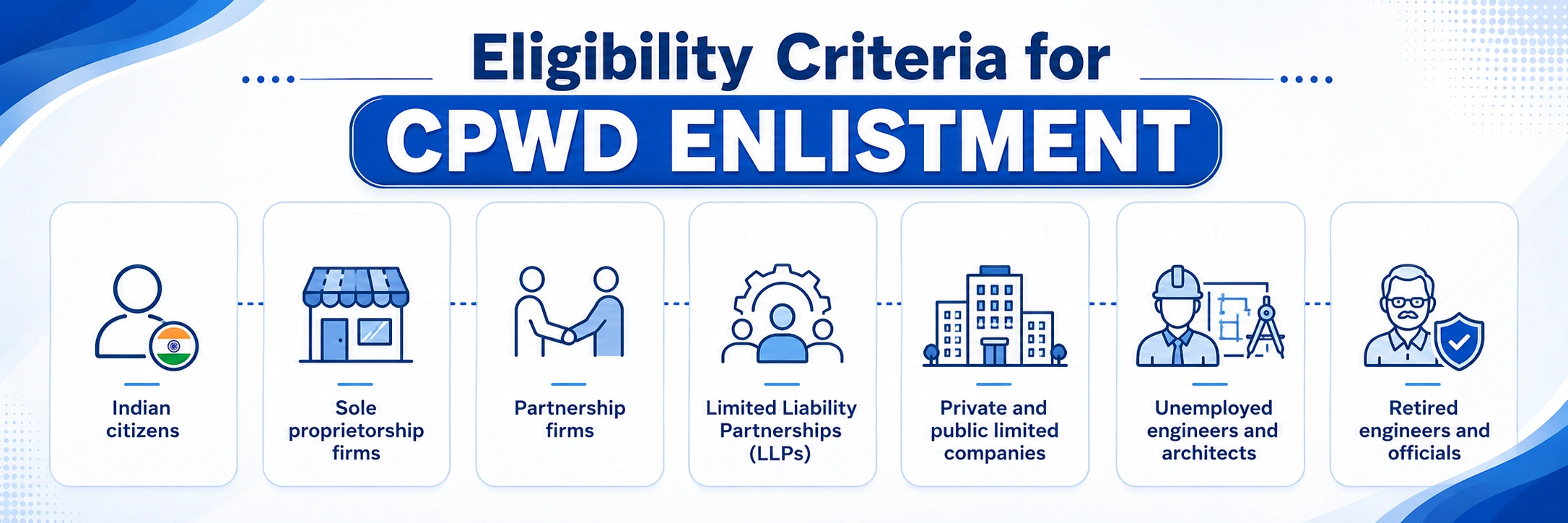
The following entity types are eligible under ER-2026:
ER-2026 restriction: A partner or director of an already enlisted CPWD firm cannot simultaneously be a partner or director in any other CPWD-enlisted firm. Dual enlistment in the same category under different names is not permitted.
Choose your class carefully before paying the non-refundable fee. Your class determines which tenders you can bid for — and applying for the wrong class is one of the most common and costly mistakes. This table below gives complete breakdown on details about the CPWD contractor class eligibility:
| Class | Tendering Limit | Minimum Experience (B&R) | Average Annual Turnover | Fee (BharatKosh) |
| Class I (Super) | Up to ₹650 Cr | 1 project ≥ ₹42 Cr or 2 ≥ ₹21 Cr | ₹208 Cr+ | ₹40,000+ |
| Class I (AAA) | Up to ₹260 Cr | 1 project ≥ ₹21 Cr or 2 ≥ ₹10.5 Cr | ₹83.2 Cr+ | ₹35,000 |
| Class I (AA) | Up to ₹130 Cr | 1 project ≥ ₹10.4 Cr or 2 ≥ ₹5.2 Cr | ₹41.6 Cr+ | ₹30,000 |
| Class I (A) | Up to ₹75 Cr | 1 project ≥ ₹6.4 Cr or 2 ≥ ₹3.2 Cr | ₹24 Cr+ | ₹25,000 |
| Class I | Up to ₹50 Cr | 1 project ≥ ₹2.4 Cr or 2 ≥ ₹1.2 Cr | ₹16 L+ | ₹20,000 |
| Class II | Up to ₹15 Cr | 1 project ≥ ₹64 L or 2 ≥ ₹30 L | ₹4.8 L+ | ₹15,000 |
| Class III | Up to ₹4 Cr | 1 project ≥ ₹20 L or 2 ≥ ₹10 L | ₹1.28 L+ | ₹10,000 |
| Class IV | Up to ₹1.3 Cr | 1 project ≥ ₹60 L or 2 ≥ ₹30 L | ₹41.6 L+ | ₹5,000 |
| Class V | Up to ₹40 L | 1 project ≥ ₹15–20 L | ₹12.8 L+ | ₹3,000 |
Note: Experience values and net worth are indicative. Exact class requirements are defined in ER-2026. Fees are paid via BharatKosh and are non-refundable. Always verify the current requirements on enlistment.cpwd.gov.in or contact The License Hub before applying.
Prepare all documents before opening the CEMS portal. Incomplete submissions are the primary cause of delays and rejections.
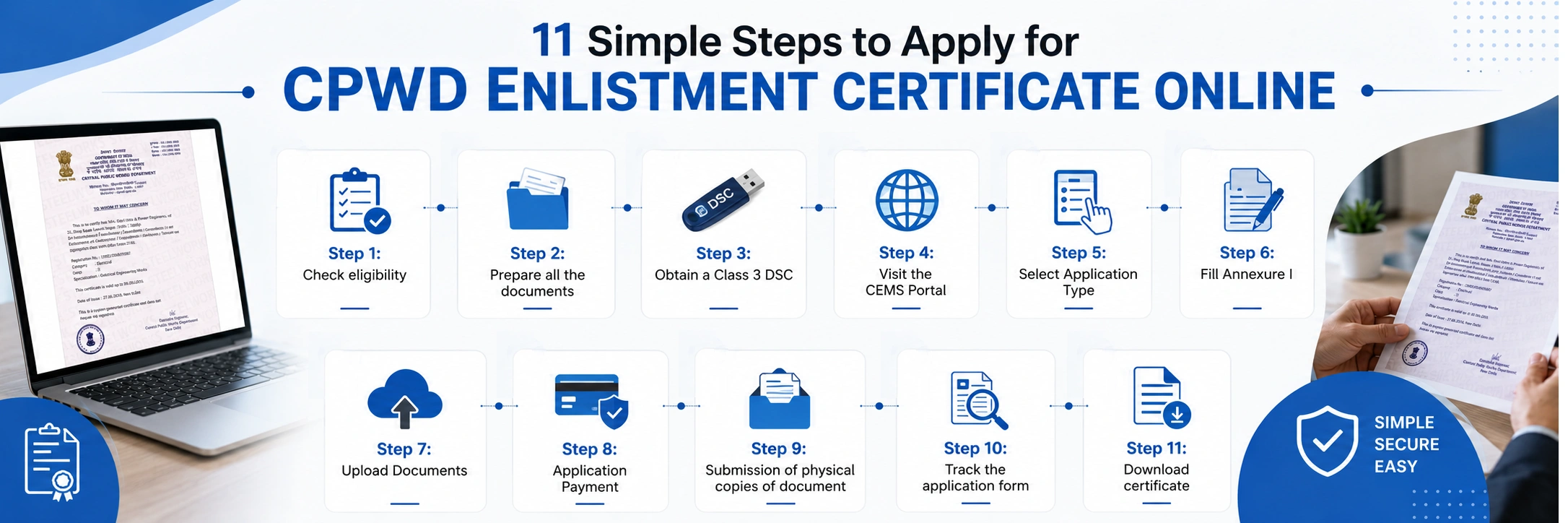
According to new CPWD enlistment rules 2026 For getting CPWD Enlistment Certificate each of these 11 step must be followed carefully. Every step matters. Missing anyone can result in delays or rejection.
Confirm which category (B&R or Horticulture) and class matches your experience and financial capacity. Use the class table above.
Applying for the wrong class with a non-refundable fee is a costly mistake.
Gather all technical, financial, statutory, and identity documents as per the checklist for your class before you open the CEMS portal.
Incomplete documents are the top reason for rejection.
A valid Class 3 Digital Signature Certificate is mandatory for online registration and for e-tender participation after enlistment.
Thus before starting the registration process for CPWD license make sure you have a valid Class 3 DSC.
Go to enlistment cpwd.gov.in. Click on the 'New Contractor Registration.
Enter your PAN (used as your login ID), mobile number, and email.
Verify via OTP to generate credentials.
Once you have done registration on cpwd.gov.in the next step involves the careful selection of the category you are applying for.
Choose: New Enlistment, Upgradation, Revalidation, or Profile Change. Depending upon your demands.
For first-time applicants, select New Enlistment.
Complete the detailed application form: business entity details, partners/directors, financials, bank information, project experience, and technical staff.
Make sure you upload the authentic and genuine details. Double-check every field before proceeding to the next step.
A small mistake during filling of Annexure I often result in rejection of CPWD license during verification stage.
Upload scanned copies of all required documents.
Ensure files are clear, legible, and within the portal's size limits.
File names and content must match the application details exactly.
Pay Fee via BharatKosh — Pay the applicable enlistment fee online through BharatKosh.
Upload the electronic payment receipt as part of your application.
This fee is non-refundable under all circumstances.
Submit and Send Physical Copies — Mark the application FINAL on CEMS, print it, and send physical documents by speed post/courier to: CPWD Enlistment Section, Nirman Bhawan, New Delhi — 110011.
Track Status and Respond to Queries — Monitor your application status on the CEMS dashboard. CPWD may request additional documents or clarification.
Respond within the stipulated time to avoid delays.
Download the Enlistment Certificate — Once approved (typically 15–30 working days for complete applications), log in to the CEMS portal, navigate to your dashboard, and download the CPWD Enlistment Certificate.
Keep digital and printed copies for all future tender submissions.
Most rejections are preventable. Here is what typically goes wrong — and exactly how to avoid it:
| Common reasons for rejection | What goes wrong | How to avoid it |
| Wrong class selection | Fee paid for a class you don't qualify for — non-refundable | Verify experience and net worth against class requirements before paying |
| Incomplete documents | Missing any one document causes rejection or delay | Use the full checklist; The License Hub reviews before submission |
| No physical copy to Nirman Bhawan | Online submission alone is not complete — physical docs required | Courier physical documents to CPWD Enlistment Section, Nirman Bhawan |
| Expired or outdated certificates | Work completion, solvency, ITR must be current | Check validity of every certificate before uploading |
| GST or ITR non-compliance | Mandatory uploads on CEMS — CPWD verifies directly | Ensure all tax filings are up to date before applying |
| Invalid or expired DSC | Class 3 DSC required — expired DSC blocks submission | Renew DSC before starting the CEMS application |
| PAN mismatch | PAN is your CEMS login ID — any mismatch causes rejection | Ensure PAN matches all business documents exactly |
Getting your CPWD Enlistment Certificate is not complicated — but it is unforgiving. The non-refundable fee, the physical document requirement, the class-selection decision, and the strict document standards mean that preparation is everything.
Under the updated ER-2026 rules, the process is more structured and transparent than ever — fully digital, class-based, and trackable online. For contractors who are ready and prepared, the path from application to certificate is clear.
For those who want expert guidance through every step, The License Hub is India's most experienced contractor licensing consultancy. Visit thelicensehub.com or call 9315167991 to start your CPWD enlistment today.
The official CPWD Contractor Enlistment Management System (CEMS) is at enlistment cpwd.gov.in. For technical queries, contact the helpline at 011-23063945 or 011-23063197, available Monday to Friday, 10 AM to 5 PM. Always use the official portal—avoid third-party websites that may charge unauthorized fees.
Standard processing time for complete, correct applications is 15–30 working days after physical documents are received at CPWD Enlistment Section, Nirman Bhawan. Incomplete applications, document discrepancies, or delayed responses to CPWD queries will extend this timeline. Working with The License Hub minimises delays by ensuring every step is correct from the start.
No. The enlistment fee paid via BharatKosh is non-refundable under all circumstances — including rejection, withdrawal, or reapplication. This makes class selection and document preparation critically important before payment. Always confirm your eligibility before paying.
Yes — this is one of the most important and often missed steps. Under ER-2026, online submission on the CEMS portal must be followed by sending printed and signed physical documents to the CPWD Enlistment Section, Nirman Bhawan, New Delhi — 110011, by speed post or courier. Physical documents must be received for the application to be processed.
CPWD enlists contractors under two main categories: Buildings & Roads (B&R) — for civil works, building construction, roads, bridges, and government infrastructure; and Horticulture — for landscaping, plantation, nursery development, and garden maintenance on government property. You must choose the correct category at the time of application and can only bid within your enlisted category.
Yes. The License Hub manages the complete process — free eligibility check, document preparation and review, CEMS filing, BharatKosh payment, physical document dispatch, and follow-up with CPWD until your certificate is issued. Our team includes retired government officers, chartered accountants, and legal experts with 30+ years of combined experience. Contact us at 9315167991 or thelicensehubs@gmail.com.
